
Project management software for agencies
One page per client job: the team, the freelancers, the client and the invoice.
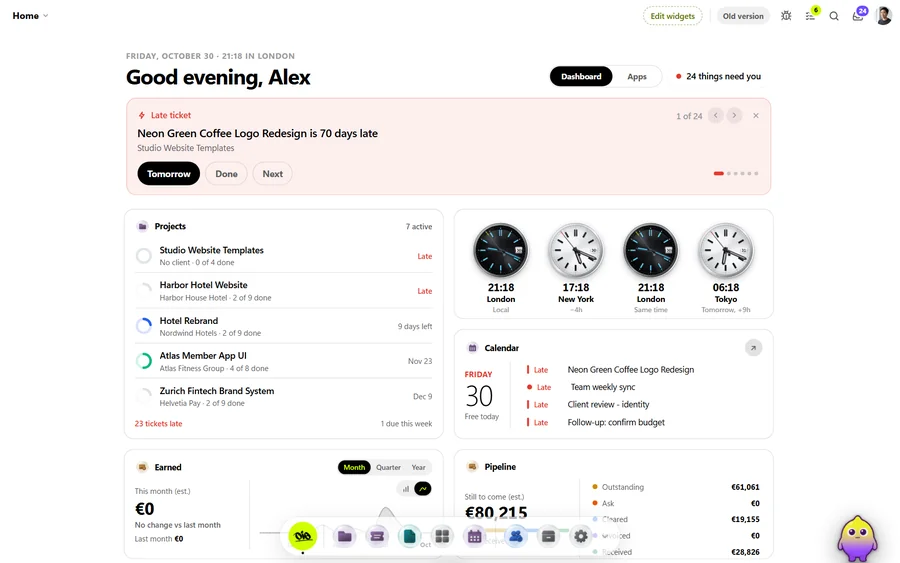
An agency job is a client, a brief, a team of three or four, a freelancer or two, rounds of feedback and an invoice at the end, often with several jobs running for the same client. OIO gives each job one project page and each deliverable one ticket, with the client's review and approval and the quote and the invoice on the same page.
No card. Set up takes ten minutes.
Where the job goes wrong
The work is split across a task tool, a chat, a shared drive, a review link and an invoicing app. The account lead knows what the client approved, the designer knows which file is current, and the freelancer knows only what was in the last message.
When the client asks where things stand, someone writes a status email by hand. When the job ends, someone retypes the quote into an invoice, and the extra round the client asked for in week three is forgotten.
How a client job runs in OIO
- 1
Lead and proposal
An enquiry comes in through your site, you have a call, and a proposal goes out with the scope, the rounds and the fee.
In OIO: The lead form brings the enquiry into your prospects. The proposal is made in OIO and the client signs it online without an account, with an audit trail behind the signature.
- 2
Kickoff and plan
The brief, the files, the deadline and who does what.
In OIO: The project page holds the brief, the files and the deadline. Each deliverable is a ticket with an assignee and dates, on a kanban or a timeline. Projects, clients and tickets you already have can come in from a CSV file.
- 3
The team and the freelancers
The team works on several jobs at once; freelancers join for part of one.
In OIO: Your team works in the project, with chat and @mentions next to the tickets. A freelancer gets a link to one ticket: they read the brief, upload the work and mark it done, with no account and no seat.
- 4
Client review and approval
Drafts go to the client, notes come back, and one version is approved.
In OIO: Upload a draft to the ticket. The client pins notes on an image or comments on a video at the second, and clicks Approve this version when it is right. OIO keeps who approved which version and when, and a ticket waiting on the client shows Needs feedback.
- 5
Status for the client
The client wants to know where the job stands without booking a call.
In OIO: The client signs in to their own client space and sees their projects, the deadlines, your updates and the tickets you set to Client. Internal tickets and hours stay with you.
- 6
Quote, costs and invoice
The fee was agreed per deliverable or per phase. Freelancers invoice you in their own currency.
In OIO: The quote and the invoice come from the project, in any currency, and the accepted quote becomes the invoice without retyping. Freelancer fees and other costs go on the same project at the day's rate, so the budget against what was spent and paid is on one page.
Pricing the job, not the hours
Most agency work is sold as a fixed fee per deliverable or per phase, with the number of feedback rounds in the proposal and a deposit before work starts. The hours still matter, because they show whether the fee was right.
In OIO the quote lines carry a quantity, a unit and a price, the hours go on each ticket as a number, and the project shows the budget, the hours and what has been paid. An extra round the client asked for becomes a line on the next invoice, with the ticket's history behind it.
What OIO does not do
Better to know before you move a live job over.
- There is no time tracker. Hours on a ticket are a number you enter, so an agency that bills from timesheets needs another tool.
- There is no resource planning or capacity view across the team.
- There are no automations that assign or move work on their own.
- Review has no freehand drawing and no pins on a PDF.
- OIO does not take payments. Clients pay by bank transfer, your own payment link or crypto, and you mark the invoice paid.
See it working
Short recordings of the real app, click to play.
What it costs
Free for one project with every app on, no card. Solo $19 a month, Studio $99 a month for 5 seats. People who only view, and freelancers on a ticket link, use no seat.
Start with one free projectNo card. Set up takes ten minutes.
Questions
Which project management software suits an agency?
The one that holds the whole client job. If your agency bills from timesheets and plans resources across twenty people, an agency management tool such as Productive or Scoro fits better. If you sell fixed fees, work with freelancers and want client review and the invoice on the project, OIO is built for that.
Can the client review and approve work in OIO?
Yes. The client pins numbered notes on an image or comments on a video at the second, and clicks Approve this version. OIO records who approved which version and when, tells you, and sends the client one reminder a day while a ticket needs their feedback. You can switch the reminder off.
Do my freelancers need a seat or an account?
No. You send a freelancer a link to one ticket. In a browser they read the brief and the checklist, download the files, upload their work, comment and set the ticket to done. Only people who edit inside the studio account take a seat.
Can we move over from ClickUp, Monday or Asana?
OIO imports projects, clients and tickets from a CSV file, and matches each column to a field you can change before the import. Comments, attachments and automations do not come across, so most agencies start the next job in OIO and leave finished ones where they are.
What does it cost for a team?
The free plan covers one project with every app on, no card. Studio is $99 a month for 5 people who edit. People who only view, and freelancers on a ticket link, use no seat.
Further reading
- A Frame.io alternative that also runs the job
- A ClickUp alternative
- A Monday.com alternative
- Asana alternative: OIO vs Asana
- OIO vs Productive
- OIO vs HoneyBook
- What a client portal should do
- Project management for 3D studios
- Project management for archviz studios
- Project management for motion design studios
- Project management for small VFX studios
- Project management for animation studios
- Project management for video production
- Project management for design and branding studios
- Project management for interior visualisation
- Project management for game art studios
- OIO for studios that work with freelancers