
Project management for motion design studios
Script to cutdowns, with the freelancers on the same page.
A motion job moves through fixed stages: script and voiceover, styleframes, storyboard, animatic, animation, sound, then a pile of versions in different lengths and ratios. Freelance illustrators, animators and a sound designer join for parts of it. OIO gives the job one project page and each stage or deliverable one ticket, with the quote and the invoice on the same project.
No card. Set up takes ten minutes.
Where the job goes wrong
The client signs off the styleframes, then wants a different end card after the animation is done. The voiceover is re-recorded and every timing moves. The 30-second film becomes a 30, a 15, a 6, each in 16:9, 9:16 and 1:1, and someone has to know which of the nine files is final.
Meanwhile two freelance animators work on different shots in different time zones, the sound designer needs the picture lock date, and the air date is fixed by a media booking that cost more than the whole production.
How a motion job runs in OIO
- 1
Script, voiceover, references
The script, the brand guide, the VO casting, reference films.
In OIO: The project page holds the brief, the files and the air date. References and early sketches go on the project whiteboard.
- 2
Styleframes and storyboard
Three to five frames to set the look, then a board for the whole film. This is the stage the client should sign off before animation starts.
In OIO: A ticket for styleframes and one for the board, each with its dates. The client's sign-off is written into the ticket when it comes, so it is on record when the end card question comes back.
- 3
Animatic and animation
The animatic locks timing to the VO. Animation is split by shot or scene, often between freelancers.
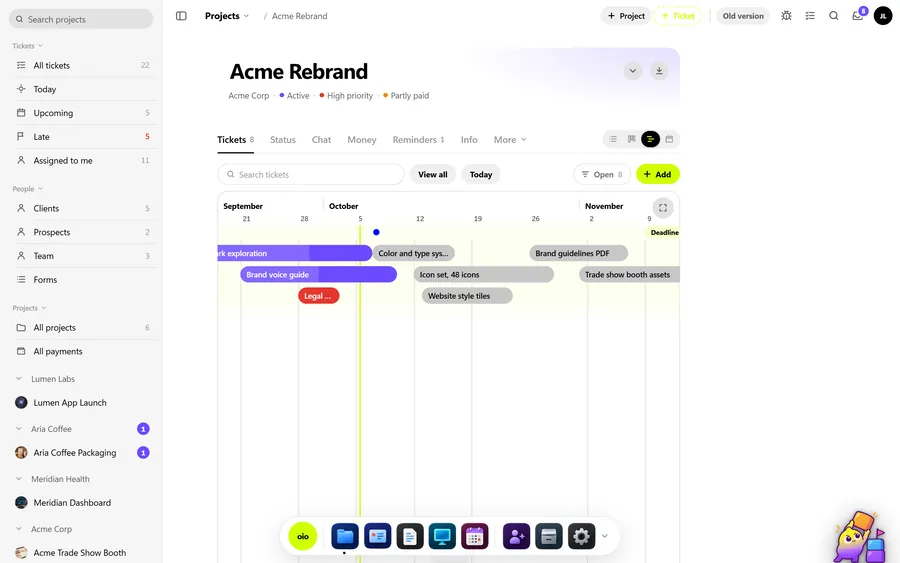
In OIO: One ticket per shot or scene, assigned and dated on the timeline. Freelance animators get a link to their ticket: they read the brief, download the assets, upload their passes and mark it done.
- 4
Feedback on passes
Notes come with timecodes: "0:12 logo lands too late", "0:21 hold two frames longer".
In OIO: Notes go on the shot's ticket as checklist items with the timecode at the start. The animator sees the same list on their link and ticks it off.
- 5
Sound, cutdowns and deliverables
Mix and master, then the master in each length and ratio, plus captions and a clean version.
In OIO: One ticket per deliverable or per group of versions. Deliver with download links up to 1 GB per video file that expire after 1, 7 or 30 days.
- 6
Quote, freelancer cost, invoice
Quoted as the main film plus cutdowns, often with a deposit before production.
In OIO: The quote lists the film and each cutdown as lines. The invoice comes from the same project, and each freelancer's fee is recorded there in their currency at the day's rate.
Quoting per deliverable
Motion work is usually quoted as the hero film with a price for its length and complexity, then each cutdown and each extra ratio as a smaller line. Stating the number of feedback rounds per stage (styleframes, animatic, animation) is what protects the schedule.
In OIO the quote lines carry a quantity and a unit, so "3 x 9:16 cutdown" reads the way the client will check it. A change after sign-off becomes an extra line on the invoice, with the ticket's history behind it.
What OIO does not do
Better to know before you move a live job over.
- There is no video review player. Clients cannot draw on frames or leave comments at a timecode inside OIO; notes are written with the timecode.
- There is no version stack. Name the files by version on the ticket.
- There are no plug-ins for After Effects, Cinema 4D, Blender or Premiere.
- There is no time tracker. Hours on a ticket are entered by hand.
What it costs
Free for 3 projects and 3 clients, no card. Solo $12 a month, Pro $29, Studio $69 a month for 5 seats. People who only view, and freelancers on a ticket link, use no seat.
Start with one free projectNo card. Set up takes ten minutes.
Questions
Can clients leave comments on the video in OIO?
No. OIO has no video player with timecoded comments. Clients send notes with timecodes and you put them on the ticket. If frame-accurate review is the centre of your process, keep a review tool for that and run the project in OIO.
How do I lock the styleframes so changes later are billable?
Write the sign-off into the styleframes ticket when it comes in, with the date. If the look changes after animation starts, that ticket is the record for the extra line on the invoice.
Do my freelancers need a seat or an account?
No. You send a freelancer a link to one ticket. In a browser they read the brief and the checklist, download the files, upload their work, comment and set the ticket to done. Only people who edit inside the studio account take a seat.
How do I send large video files?
With a download link. Video files go up to 1 GB each and the link expires after 1, 7 or 30 days. Storage counts against your plan.
Does it work for a studio of two?
Yes. The free plan covers 3 projects, and freelancers on ticket links never use a seat. The Studio plan is for 5 people who edit.
Further reading
- Managing freelancers in a small 3D studio
- Best project management software for 3D studios (2026)
- ShotGrid alternatives for small studios
- OIO vs ftrack
- A ClickUp alternative for creative studios
- Project management for 3D studios
- Project management for archviz studios
- OIO for studios that work with freelancers