
Project management for archviz studios
Every view on one page, and the client can see where each one is.
An archviz job is a set of views for one development: an aerial, two street-level exteriors, a lobby, a show apartment, maybe a flythrough. Each view goes through cameras, a draft and feedback from more than one person before the final. OIO gives the development one project page and each view one ticket, with a status link the architect can open whenever they want to know where things are.
No card. Set up takes ten minutes.
Where the job goes wrong
The architect sends a Revit or SketchUp model, the plans and a material schedule, then revises the facade a week in. The developer's marketing team joins the second feedback round with its own opinions about the sky. The deadline is the planning submission or the sales launch, and it does not move.
Feedback arrives from three people in three channels. Camera approvals get lost, a material change lands after the lighting is done, and nobody can say whether the kitchen view is on round two or round three. Meanwhile the studio is paying a freelancer for furniture and landscape modelling, in a different currency.
How an archviz job runs in OIO
- 1
Model, plans and materials
The architect's model, the plans, the material and finishes schedule, site photos for the backplates.
In OIO: The project page holds the brief, the files and the submission date. Material boards and reference images go on the project whiteboard.
- 2
One ticket per view
Aerial, two exteriors, lobby, show apartment, amenity deck. Each view is priced, reviewed and delivered on its own.
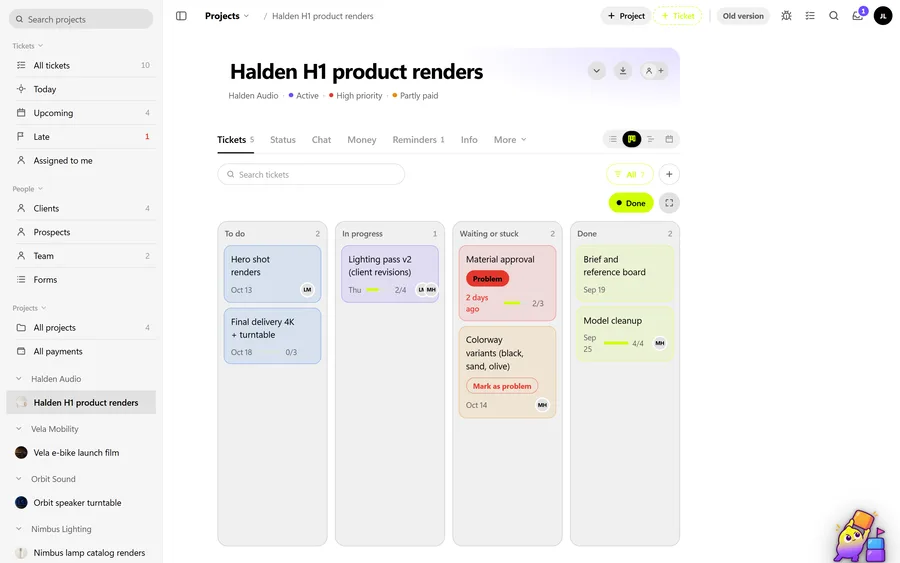
In OIO: Each view is a ticket with its own dates. The kanban shows which views are drafting, waiting on the client or done; the timeline shows them against the deadline.
- 3
Camera approval
Clay renders or grey previews to fix the cameras before any time goes into materials and lighting.
In OIO: Upload the camera previews to each view's ticket. Note the approved camera in the ticket's checklist, so the decision is written down where the work happens.
- 4
Drafts and feedback rounds
Materials, lighting, entourage. The architect comments, then the developer, then the architect again.
In OIO: Put each round's notes on the ticket's checklist, numbered by round, and set the ticket to hold while you wait. Feedback calls can be recorded and transcribed on paid plans, so a note given on a call is not lost.
- 5
Freelancers on furniture, landscape, people
A freelancer models the furniture set or the planting. Another does post on the final images.
In OIO: Each gets a link to their ticket: brief, files, comments, upload, done. Their fee goes on the project as a cost in their currency, at the day's rate.
- 6
Status for the architect and the developer
Clients ask "where are we" more often than they give feedback.
In OIO: A password-protected status link shows each view and its status, the deadline and your updates. If you switch it on, it also shows the budget and lets the client confirm an amount is OK to invoice.
Quoting per view
Archviz is usually quoted per image, with exteriors priced above interiors, aerials above both, and an animation priced per second or per shot. The quote names the number of feedback rounds included, and that number is what keeps the job profitable.
In OIO each view is a line on the quote with a quantity and a price per image, so the quote and the tickets match one to one. Extra rounds beyond the quote go on the invoice as their own line.
What OIO does not do
Better to know before you move a live job over.
- There is no markup on images. Architects who like to draw on a render will send a PDF or a screenshot; it goes on the ticket as a file.
- There is no version stack per view. Name files by round if you keep the history on the ticket.
- There are no plug-ins for 3ds Max, Corona, V-Ray, D5, Lumion, Unreal or Twinmotion.
- There is no client login. Clients follow the job on a status link and get files from download links.
What it costs
Free for 3 projects and 3 clients, no card. Solo $12 a month, Pro $29, Studio $69 a month for 5 seats. People who only view, and freelancers on a ticket link, use no seat.
Start with one free projectNo card. Set up takes ten minutes.
Questions
Can the architect see progress without an account?
Yes. The status link shows the project, each view with its status and dates, the deadline and the updates you post. It is protected by a password you set. It never shows ticket contents, files or hours.
Can the client approve an image in OIO?
Not as a formal approval step. OIO has no approve button on a deliverable. Write the approval into the ticket when it comes in. The status link does let a client confirm that an amount is OK to invoice, which is the approval most studios actually need.
How do I handle feedback from the architect and the developer at once?
Collect both on the same ticket, one checklist per round, and settle conflicts before the round starts. The guide on feedback rounds below goes through this in detail.
Do my freelancers need a seat or an account?
No. You send a freelancer a link to one ticket. In a browser they read the brief and the checklist, download the files, upload their work, comment and set the ticket to done. Only people who edit inside the studio account take a seat.
How do I send final images?
With a download link that expires after 1, 7 or 30 days. Files go up to 100 MB each, or 1 GB for a video such as a flythrough.
Further reading
- How to manage client feedback rounds in an archviz studio
- How to price archviz images
- Managing freelancers in a small 3D studio
- Best project management software for 3D studios (2026)
- A Monday.com alternative for small studios
- Project management for 3D studios
- Project management for motion design studios
- OIO for studios that work with freelancers