
Project management for animation studios
Board to final shot, with the freelance animators on the same page.
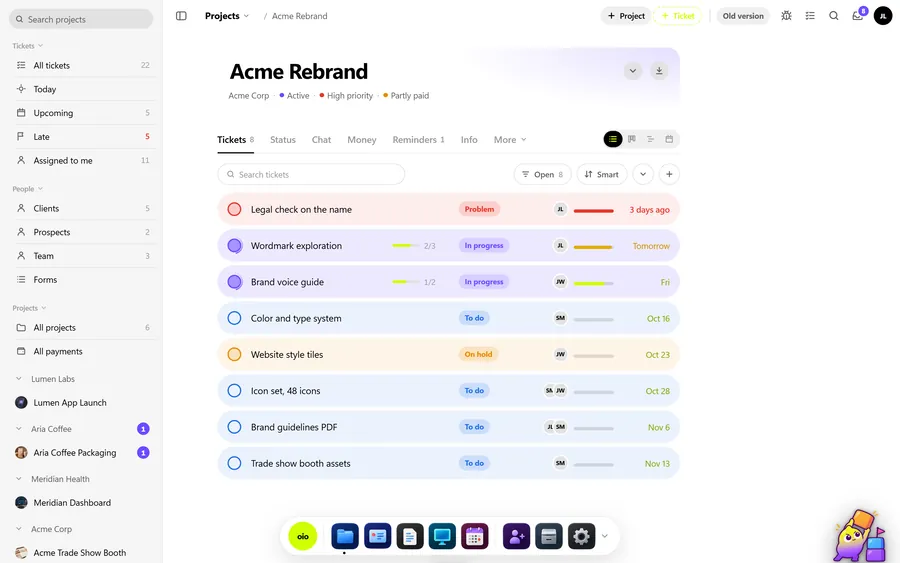
A character animation job, a short, a series pilot or a two-minute explainer, runs through design, storyboard, animatic, then shot after shot of animation, each going from blocking or rough to final. Most small studios staff it with freelancers per shot or per scene. OIO gives the production one project page and each shot or scene one ticket, with the milestone invoices on the same project.
No card. Set up takes ten minutes.
Where the job goes wrong
The animatic is approved, then the client re-records two lines of dialogue and the timing of six shots moves. Three freelance animators are halfway through those shots, and each heard about the change from a different message.
Meanwhile the budget was agreed as milestone payments: a deposit, one on animatic sign-off, one on delivery. The animatic milestone is long past and nobody sent that invoice, because it lives in a different app from the production.
How an animation job runs in OIO
- 1
Script and design
Script, character designs, props and backgrounds, a style test. The look is signed off before boarding starts.
In OIO: The project page holds the brief, the script and the delivery date. Design references go on the project whiteboard, and each design package is a ticket with its own dates.
- 2
Storyboard and animatic
The board breaks the film into shots, and the animatic locks the timing to the dialogue or the music.
In OIO: A ticket for the board and one for the animatic. Write the client's sign-off into the ticket with the date, so a timing change after it is on record.
- 3
Shots, scene by scene
Each shot goes from layout to blocking to final in 3D, or from rough to cleanup to colour in 2D.
In OIO: One ticket per shot or scene, with the stages as checklist items and the shot on the timeline. The kanban shows what is in progress, on hold for notes or done.
- 4
Freelance animators
An animator takes a scene for two weeks, often in another country.
In OIO: Send them the ticket link. They read the brief and the notes, download the files, upload their passes, comment and set the ticket to done. No account and no seat.
- 5
Notes on passes
Notes with timecodes: "0:14 the blink is too late", "hold the pose four frames longer".
In OIO: Notes go on the shot's ticket as checklist items, with the timecode at the start, numbered by round. The animator sees the same list on their link.
- 6
Milestones and invoices
Deposit on start, a payment on animatic sign-off, the rest on delivery.
In OIO: Each milestone is an invoice from the same project, in any currency. The project shows what has been invoiced and paid, and each freelancer's fee is recorded there as a cost.
Quoting per minute and per milestone
Animation is usually quoted per finished minute, adjusted for style and complexity, with design and the animatic sometimes as their own lines. Payment comes in milestones tied to sign-offs, which is what keeps cash coming in on a production that runs for months.
In OIO the quote lines carry a quantity and a unit, so "2 x minute of animation" sits next to "character design package". Each milestone becomes an invoice from the same project when its ticket is signed off.
What OIO does not do
Better to know before you move a live job over.
- There is no shot breakdown with assets cast into shots. Shots are tickets.
- There is no review player. Clients cannot comment at a timecode inside OIO; notes are written with the timecode.
- There are no plug-ins for Toon Boom Harmony, Blender, Maya or After Effects.
- There is no version stack. Name files by pass on the ticket.
- There is no time tracker. Hours on a ticket are entered by hand.
What it costs
Free for 3 projects and 3 clients, no card. Solo $12 a month, Pro $29, Studio $69 a month for 5 seats. People who only view, and freelancers on a ticket link, use no seat.
Start with one free projectNo card. Set up takes ten minutes.
Questions
How do I run a series with several episodes?
One project per episode keeps the shots, the files and the invoices of each episode apart. The client can follow all of them on one status link, which shows each project with its deadline and the status of its tickets.
Can I invoice per milestone?
Yes. Make an invoice from the project when each milestone is reached. The project shows the budget, what has been invoiced and what has been paid. OIO does not take payments; the client pays by bank transfer, your own payment link or crypto, and you mark the invoice paid.
Do my freelancers need a seat or an account?
No. You send a freelancer a link to one ticket. In a browser they read the brief and the checklist, download the files, upload their work, comment and set the ticket to done. Only people who edit inside the studio account take a seat.
Is this different from the motion design page?
The stages overlap. Motion design work is mostly short branded pieces with many cutdowns; character animation runs longer, by shot and scene, with milestone payments. The motion design page is linked below.
Is OIO a replacement for Kitsu?
Not if you need a shot and asset breakdown or review playlists. Kitsu does that and OIO does not. OIO is for a small studio that wants the shots, the freelancers, the client and the invoices in one place.
Further reading
- OIO vs Kitsu
- ShotGrid alternatives for small studios
- How to write a deposit invoice
- Managing freelancers in a small 3D studio
- Project management for 3D studios
- Project management for archviz studios
- Project management for motion design studios
- Project management for small VFX studios
- Project management for video production
- Project management for branding studios
- Project management for interior visualisation
- Project management for game art studios
- OIO for studios that work with freelancers