
Know where every client project stands.
Keep the next task, deadline, files and budget on one project page. Start with one current job and keep your other tools while you try OIO.
Free for 3 projects and 3 clients. No card.

One product render job, start to finish
A sample job for a headphone brand: the tickets, the one that is blocked, the budget and deadline, the recorded client call and the renders. No sound.
The questions you ask every day, answered on one page
What is next?
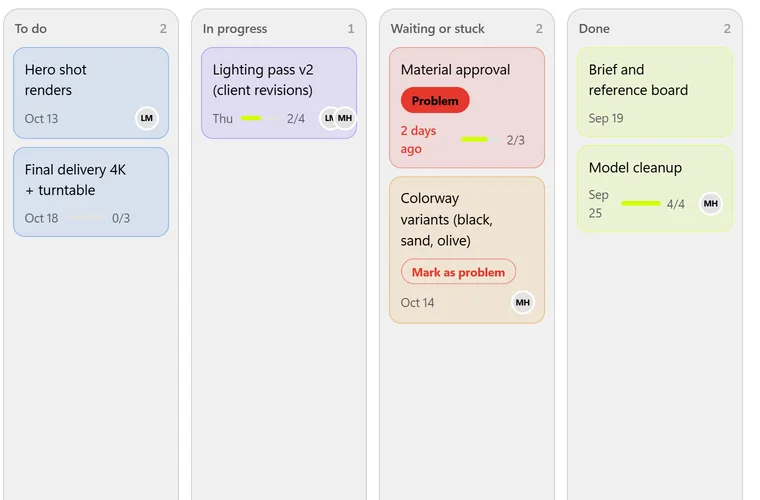
The board sorts the job into To do, In progress, Waiting or stuck and Done. Each card shows its due date, who is on it and how much of its checklist is ticked.
What is blocked?
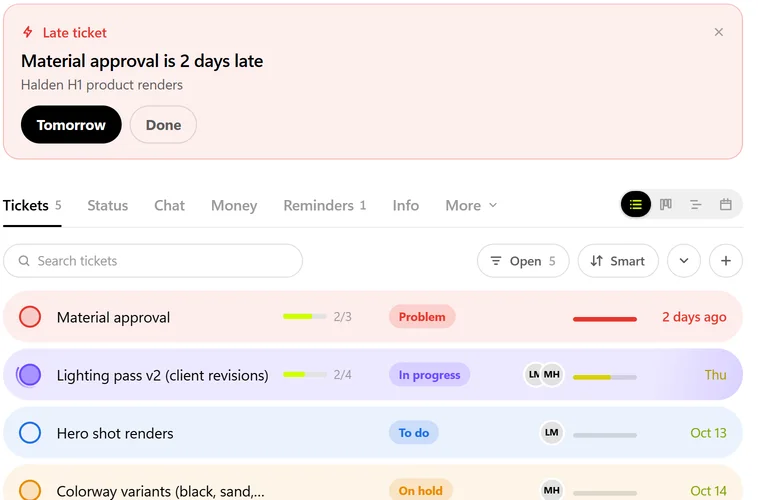
A ticket marked Problem turns red, and a late one shows on top of the project until you move it or close it.
What is due, and what is left?
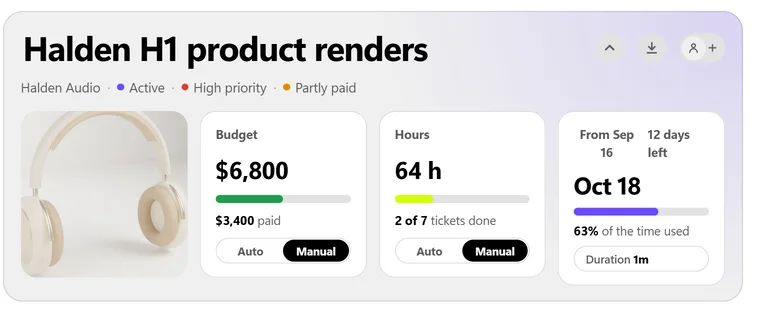
The project head shows the deadline with the days left, the budget with what has been paid, and the hours with how many tickets are done.
The feedback stays on the ticket
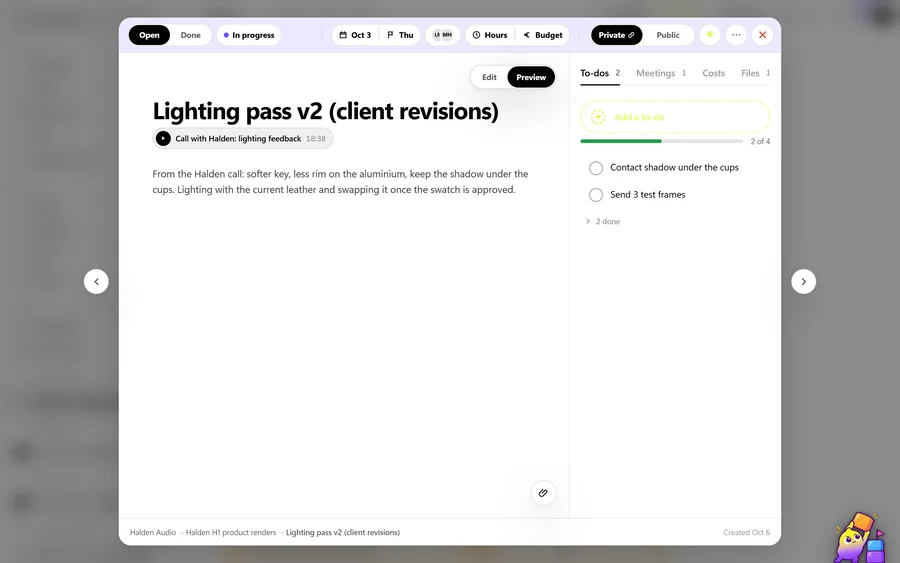
Open a ticket and its to-dos, files and the recorded call it came from are next to the work. Calls get a transcript and a summary on the paid plans.
I have worked as a freelance automotive and 3D designer since 2014 and have run a small remote team since Covid. Our client work was spread over a pile of tools, and feedback, deadlines and invoices got lost between them. I built OIO with my own money to run my own studio, and we run it on OIO every day.
The founder of OIO
Start with the job you are working on now
- Make one project. The client, the budget and the deadline. That is enough for the page to show what is left.
- Add the next few tasks as tickets. Give them a due date and, if someone helps you, a name.
- Keep your other tools while you try it. Nothing has to move on day one.
Already keep your jobs in a spreadsheet? The project, client and ticket lists each have an Import CSV button. It matches your columns, shows a preview and flags duplicates before anything is saved.
When the job needs more
Inquiry forms
Put a form on your site. New inquiries land in Prospects, and a won one becomes a client and a project.
Signing
Send a proposal or contract. The client signs on a phone without an account. One a month on the free plan.
Invoicing
The invoice comes from the project, in the client's currency. OIO does not process payments.
Monthly pricing
Free
1 editor: you
- 3 projects and 3 clients
- 1 document and 1 e-signature a month
- 256 MB of files
Solo
1 editor: you
- All apps, for one person
- Unlimited projects, clients and documents
- 25 GB of files
Pro
1 editor: you
- Everything in Solo
- Export a whole project as PDF
- 150 GB of files
Studio
5 editors
- Everything in Pro, for a small team
- You and up to 4 teammates
- 1 TB of files
An editor is someone who works on the projects. Clients and other people you invite to view a project are free on every plan and use no seat. Every paid plan has a 7-day trial. All plan details.
Questions people ask before they sign up
Is OIO free?
Yes. The free plan has no time limit and needs no card: 3 projects, 3 clients, tickets and files, one finalized document and one e-signature a month. Paid plans start at $12 a month.
Do I have to move everything over?
No. Start with one job you are working on now and keep your other tools while you try it. If your jobs live in a spreadsheet, you can import projects, clients and tickets from a CSV file later.
Can my client see the project?
Yes, if you invite them. Invite your client by email, even before they have an OIO account, and they see their project, its documents and its invoices. Viewers are free on every plan and use no seat. To sign a proposal or contract the client needs no account at all.
Do I have to invoice in OIO?
No. Some people use OIO only for their projects. When you do want to bill, the invoice comes from the project and already knows the client.
Does OIO take card payments?
No. OIO does not process payments and does not watch your bank account. Your client pays you the way the invoice says, by bank transfer, your own payment link or crypto, and you mark the invoice paid.
Start with one project
Set up the job you are working on now in a few minutes. Keep your other tools while you try it.
Start your first projectFree for 3 projects and 3 clients. No card.