
Project management for interior visualisation studios
Every room and every variant on one page.
Interior work for designers, furniture brands and kitchen makers is rooms and variants: a living room in three fabric options, a kitchen in four fronts and two worktops, a bedroom set for the catalogue. Each image goes through cameras, a draft and finish swaps, and the variants multiply. OIO gives each client job one project page and each room or variant set one ticket, with the quote per image on the same project.
No card. Set up takes ten minutes.
Where the job goes wrong
The designer sends a floor plan, a mood board and a product list with SKUs, then swaps the sofa fabric after the lighting is done. The furniture brand wants the same room in five colourways for the web shop, each a little different.
Feedback comes on calls, "warmer wood, less reflection on the worktop", and a week later nobody is sure whether it was the oak or the walnut that was approved. The freelancer modelling the custom joinery is working from last week's drawing.
How an interior job runs in OIO
- 1
Plans, finishes and products
Floor plans and elevations, the finishes schedule, product links and SKUs, the mood board.
In OIO: The project page holds the brief, the files and the deadline. Mood boards and finish samples go on the project whiteboard.
- 2
One ticket per room or variant set
Living room, kitchen, bedroom, each with its own variants.
In OIO: A ticket per room, with each variant as a checklist item, or a ticket per variant when each one is priced on its own. The kanban shows what is drafting, waiting on the client or done.
- 3
Cameras and clay
Clay renders to fix the cameras and the composition before materials.
In OIO: Upload the clay renders to the room's ticket and write the approved camera into its checklist.
- 4
Finishes and feedback calls
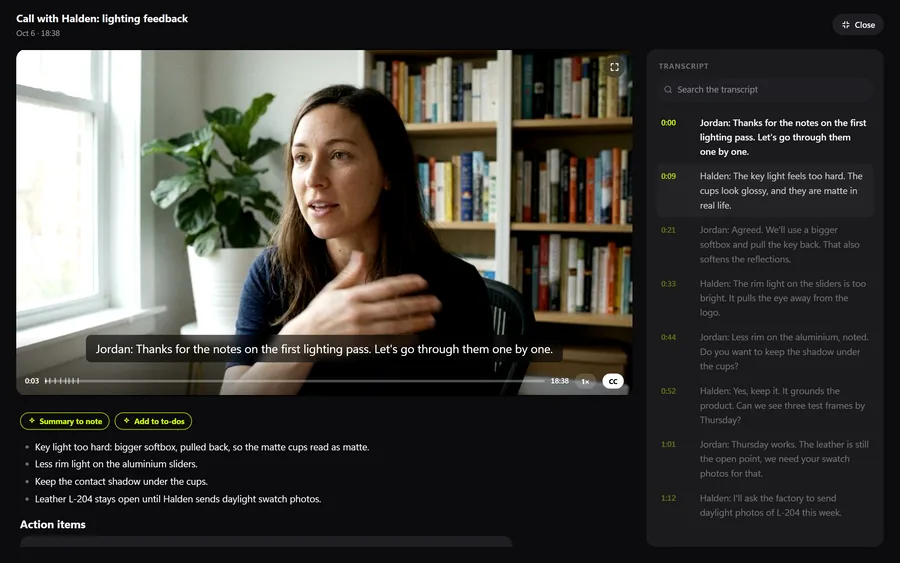
Fabric, wood, stone and metal swaps, often decided on a call.
In OIO: Calls can be recorded and transcribed on paid plans, so "walnut, not oak" is written down with the date. Each round's notes go on the ticket as checklist items, numbered by round.
- 5
Freelancers on custom models
A freelancer models the bespoke joinery or a furniture range from the maker's drawings.
In OIO: Send them the ticket link with the drawings. They upload their models or renders, comment and set the ticket to done, with no account and no seat.
- 6
Finals and invoice
Final images per room and per variant, sometimes in two crops for print and web.
In OIO: Send the finals with a download link that expires after 1, 7 or 30 days. The invoice comes from the project, with the variants as their own lines.
Quoting per image and per variant
Interior images are usually quoted per view, with each extra variant of the same camera priced lower, because the scene is built once. Custom models a maker cannot supply are a separate line, and the quote names the rounds of finish changes included.
In OIO the quote reads that way: "4 x interior view", "10 x colourway variant", "custom joinery model". Extra variants requested after the quote become lines on the invoice, with the ticket's checklist as the record of what was asked.
What OIO does not do
Better to know before you move a live job over.
- There is no markup on images. Designers who want to draw on a render send a marked-up file; it goes on the ticket.
- There is no product configurator and no link to a web shop's product data.
- There are no plug-ins for 3ds Max, Corona, V-Ray, D5 or Blender.
- There is no version stack. Name files by round and variant on the ticket.
What it costs
Free for 3 projects and 3 clients, no card. Solo $12 a month, Pro $29, Studio $69 a month for 5 seats. People who only view, and freelancers on a ticket link, use no seat.
Start with one free projectNo card. Set up takes ten minutes.
Questions
How do I track many variants of the same room?
One ticket per room, with each variant as a checklist item, works when the variants are delivered together. When each variant is priced and approved on its own, make it its own ticket. Both show on the kanban and the timeline.
Is this different from the archviz page?
The workflow overlaps. Archviz jobs are usually views of a development for architects and developers; interior jobs are rooms and product variants for designers, furniture brands and kitchen makers, with more finish swaps. The archviz page is linked below.
Can I record a feedback call with the client?
On paid plans, yes. Calls are recorded and transcribed in OIO, so a finish decision made on a call is written down.
Do my freelancers need a seat or an account?
No. You send a freelancer a link to one ticket. In a browser they read the brief and the checklist, download the files, upload their work, comment and set the ticket to done. Only people who edit inside the studio account take a seat.
Can the client follow progress without an account?
Yes. A password-protected status link shows each room's ticket with its status, the deadline and your updates. It never shows ticket contents, files or hours.
Further reading
- How to price archviz images
- How to manage client feedback rounds in an archviz studio
- AI workflows for 3D and archviz studios
- Best project management software for 3D studios (2026)
- Project management for 3D studios
- Project management for archviz studios
- Project management for motion design studios
- Project management for small VFX studios
- Project management for animation studios
- Project management for video production
- Project management for branding studios
- Project management for game art studios
- OIO for studios that work with freelancers