Project management for branding and design studios
Enquiry to brand guidelines, on one page per client.
A branding job runs in phases: discovery, strategy, two or three concept directions, refinement, then the identity system and the guidelines, with a pile of applications at the end. The client signs a proposal, pays a deposit and joins a workshop, and then waits for concepts. OIO gives each client job one project page and each phase or deliverable one ticket, from the lead form and the signed proposal to the final invoice.
No card. Set up takes ten minutes.
Where the job goes wrong
The proposal said two concept directions and two rounds of refinement. In week four the client's new marketing director asks for a third direction, and the studio cannot find where the original scope was agreed.
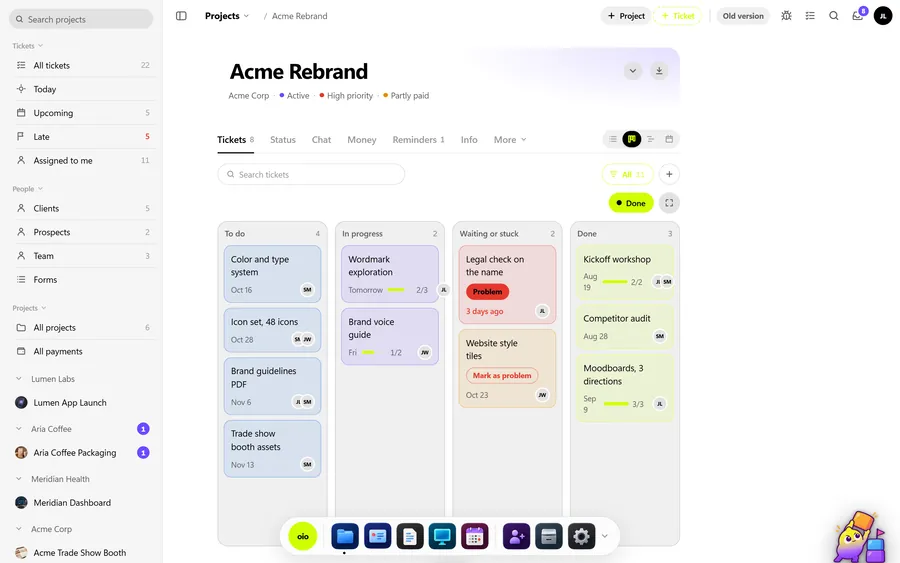
Meanwhile the legal check on the name is stuck, the icon set waits on it, and the freelance illustrator doing the brand illustrations has no idea that the palette changed last week. The client asks for status twice a week.
How a branding job runs in OIO
- 1
Enquiry and proposal
A lead fills in a form on your site, you have a call, and you send a proposal with the phases, the rounds and the fee.
In OIO: The lead form brings the enquiry into your prospects. The proposal is made in OIO and the client signs it online, on any device, without an account, with an audit trail behind the signature.
- 2
Discovery and strategy
A kickoff workshop, research, competitor audit, positioning.
In OIO: Record and transcribe the workshop on a paid plan, so what the client said is on the project. Moodboards and research go on the project whiteboard.
- 3
Concept directions
Two or three directions, presented, then one is chosen.
In OIO: A ticket per direction or one for the concepts phase. Write the chosen direction and the date into the ticket, so the decision is on record when it is questioned later.
- 4
Refinement and the system
Wordmark, colour, type, icons, illustration, brand voice.
In OIO: A ticket per part of the system, with dates on the timeline. The kanban shows what is blocked; a ticket set to problem, like the legal check on a name, is visible to the whole team.
- 5
Freelancers on illustration or motion
An illustrator or a motion designer joins for part of the system.
In OIO: Send them the ticket link. They read the brief, download the files, upload their work and set the ticket to done, with no account and no seat.
- 6
Guidelines, files and the final invoice
The guidelines PDF, logo files in every format, templates.
In OIO: Send the files with a download link that expires after 1, 7 or 30 days. The final invoice comes from the same project, and the status link shows the client that everything is done.
Pricing per phase
Branding is usually a fixed fee split by phase, with the number of concept directions and refinement rounds written into the proposal, and a deposit before work starts. That written scope is the only thing that makes a third direction a paid one.
In OIO the proposal lists each phase as a line, the client signs it online, and the invoices for the deposit and the balance come from the same project. An extra direction becomes its own line on the next invoice, with the signed proposal on the project as the record.
What OIO does not do
Better to know before you move a live job over.
- There is no markup on designs. Clients cannot draw on a concept in OIO; their notes arrive as text or a marked-up PDF on the ticket.
- There is no brand asset portal or DAM for the client after the project.
- There is no approval button on a deliverable. Write the approval into the ticket when it comes.
- There are no plug-ins for Figma or Adobe apps.
- OIO does not take payments. Clients pay by bank transfer, your own payment link or crypto.
What it costs
Free for 3 projects and 3 clients, no card. Solo $12 a month, Pro $29, Studio $69 a month for 5 seats. People who only view, and freelancers on a ticket link, use no seat.
Start with one free projectNo card. Set up takes ten minutes.
Questions
Can the client sign the proposal online?
Yes. The proposal or contract goes out as a link, and the client signs on any device without an account. The signature comes with an audit trail and a certificate.
Can leads come in from my website?
Yes. A lead form on your site brings each enquiry into your prospects, so new leads are in the same app as the projects they turn into.
Can the client see progress without asking?
Yes. A password-protected status link shows the project, each ticket's status, the deadline and the updates you post. It never shows ticket contents, files or hours.
Do my freelancers need a seat or an account?
No. You send a freelancer a link to one ticket. In a browser they read the brief and the checklist, download the files, upload their work, comment and set the ticket to done. Only people who edit inside the studio account take a seat.
Does it work for a studio of two?
Yes. The free plan covers 3 projects and 3 clients, no card. The Studio plan is for 5 people who edit, and freelancers on a ticket link never use a seat.
Further reading
- How to get a proposal signed online
- Client onboarding checklist
- How to price a project
- OIO vs Basecamp
- OIO vs Function Point
- Project management for 3D studios
- Project management for archviz studios
- Project management for motion design studios
- Project management for small VFX studios
- Project management for animation studios
- Project management for video production
- Project management for interior visualisation
- Project management for game art studios
- OIO for studios that work with freelancers